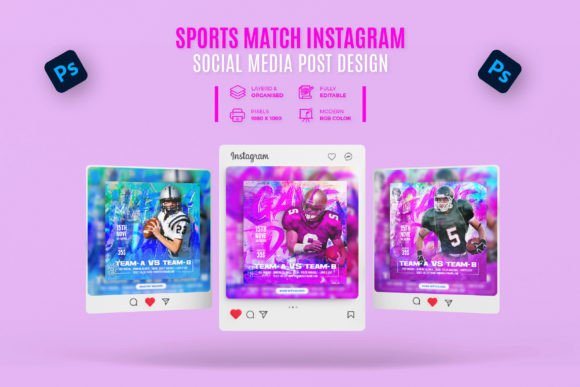
Sports Match Social Media Square Banner Template
You have a sports event, a tournament, or a league to promote, and you need visuals that capture the energy of the game. The Sports Match Social Media Square Banner is a professional design template built for exactly that purpose. Whether you run a local soccer club, coach a youth basketball team, or manage a fitness brand, this template offers a straightforward way to create polished social media graphics without hiring a designer or spending hours in front of a screen.
What This Template Offers
At its core, this banner is a layered Adobe Photoshop file set to the standard 1080x1080 pixel square format. That size works across Instagram, Facebook, LinkedIn, and even Twitter, so you get one design that fits most major platforms. The template comes in three separate PSD files, each arranged at 72 DPI in RGB color mode. Because the layers are well-organized and clearly labeled, you can open any file and immediately see where to drop in your own team logo, player photo, match score, or call-to-action.
What makes this template particularly useful is the included help guide. Even if you only know the very basics of Photoshop—moving layers, changing text, and swapping images—you can produce a banner that looks intentional and clean. The fonts used are free to download, and a link to them sits right inside the main file, so there is no guessing or hunting around for missing typefaces.
Key Characteristics That Make It Stand Out
Several qualities make this template a practical choice for busy professionals and creators alike.
- Easy customization – The file is designed for quick edits. Double-click a text layer, type your match details, and you are done. Color adjustments happen through adjustment layers or simple layer styles, so you never need to dig into complicated masking.
- Multiple file versions – Three Photoshop files give you different starting points. You might use one layout for a league announcement, another for a final score graphic, and the third for a player spotlight post. This variety saves you from having to design each variation from scratch.
- Print-ready resolution basics – While 72 DPI is standard for screen use, the 1080x1080 dimension ensures your image displays sharply on mobile devices and desktop feeds alike. The RGB color mode guarantees consistent color across monitors and phones.
- Included help guide – The guide walks you through the editing process step by step. It is short enough to read in one sitting but covers the essentials: how to change text, replace images, and adjust colors.
These features together mean you spend less time wrestling with software and more time getting your message out.
Sports Clubs and Local Leagues
If you manage a community soccer league or a weekend basketball tournament, you need to post schedules, scores, and sponsor shout-outs regularly. With this template, you can create a consistent look for all your posts. Imagine publishing a match preview on Friday, a halftime score update on Saturday, and a final result graphic on Sunday—all with the same visual style. That consistency builds recognition among your followers and helps your page look professional even if your budget is small.
Personal Trainers and Fitness Coaches
Fitness professionals often use social media to showcase client progress, promote upcoming training sessions, or share motivational content. A clean square banner works well for announcing a new bootcamp series or highlighting a client achievement. The Sports Match layout is especially suited for before-and-after images, workout challenges, or event countdowns. You can swap the team photo for a training shot and change the text to reflect your brand voice.
Schools and Educational Programs
High school athletics departments and college recreation centers rely on social media to communicate with students and parents. Using a template like this saves the administrative staff from reinventing the flyer every season. A quick edit turns the same file into a football game announcement, a swim meet schedule, or a spirit week reminder. The help guide makes it easy for a work-study student or volunteer to handle the updates without formal design training.
Small Business Marketing
Even if your business is not directly sports-related, you can adapt the template for promotional campaigns. A gym or supplement brand, for instance, might use the banner to advertise a limited-time offer or an event sponsorship. The bold layout and clear text hierarchy make it effective for driving engagement, whether you are promoting a sale, a webinar, or a community event.
Usability and Efficiency Benefits
Templates exist to remove repetitive work, and this one does exactly that. Instead of opening a blank canvas each time you need a post, you open a file where the composition is already figured out. The background, the text placement, and the image area are all prearranged. Your only job is to insert your specific content and maybe tweak the colors to match your brand palette.
If you work with a team, this efficiency multiplies. A fellow coach or a marketing assistant can pick up the file without needing a tutorial session. The layer names are plain English (e.g., “Team Name,” “Score,” “Background Color”), so there is minimal guesswork. And if you ever hit a snag, the seller offers support through their profile, which is a safety net many stock templates do not provide.
Branding and Communication Impact
Consistent branding across your social media feeds signals reliability and attention to detail. When every post uses the same banner style, your audience starts associating that look with your organization. This template gives you a foundation to build that consistency. You can set your team colors once and reuse the file for every match-related post. Over time, followers will recognize your content immediately as they scroll through their feed.
The square format itself is also communication-friendly. It works equally well on mobile and desktop, and it fits into feed grids without awkward cropping. Your message—whether it is a game time, a final score, or a player profile—stays front and center where people can see it.
Practical Considerations Before You Start
Before diving in, make sure you have Adobe Photoshop installed (any version from CS6 onward should work, and the template explicitly supports Creative Cloud versions). You will also want to have your images ready: team logos, player headshots, or action shots work great. Since the template is set to 1080x1080, your source photos should be at least that size to avoid pixelation.
Take a few minutes to read the help guide before you start editing. It explains where to find the font download link and how to handle common adjustments. Even if you are comfortable with Photoshop, the guide may point out a shortcut or layer trick that saves time.
One more practical tip: save your customized file as a PSD so you can reuse it later. That way, next week’s match post only takes a few minutes—just update the text and swap the image. Building a library of these templates for different occasions (announcements, results, promotions) turns a single purchase into a long-term asset.
Final Thoughts
The Sports Match Social Media Square Banner hits a sweet spot for anyone who needs sport-related social graphics but does not have a design team on speed dial. It is simple enough for a beginner, flexible enough for a professional, and structured enough to keep your brand consistent across multiple posts. Three file variations, a helpful guide, and easy customization make it a practical tool for clubs, trainers, schools, and small businesses alike.
If you have been spending too much time building each social post from scratch, or if your current graphics feel inconsistent, this template offers a solid shortcut. Give it a try, and you may find yourself with a few extra hours each week to focus on what really matters: the game itself.