Social Media Cover Page Template: When Minimal Design Meets Real Impact
You have probably scrolled past dozens of social media pages today alone. Some made you stop. Most did not. The difference often comes down to that first visual impression—the cover image that sets the tone before anyone reads a single word. A Social Media Cover Page Template is not just a decorative element. It is the front door of your online presence, and getting it right matters more than many people realize.
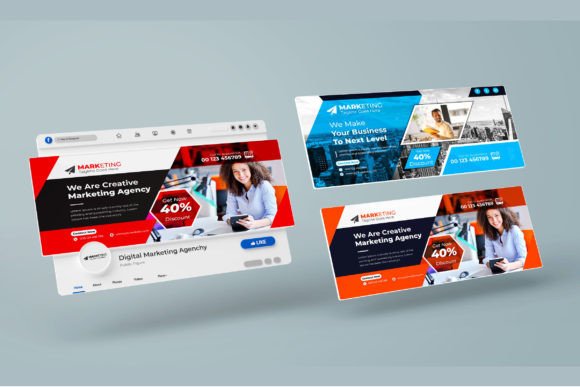
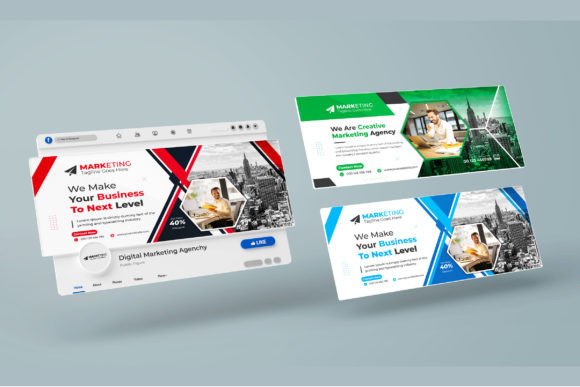
The template described here brings together several qualities that matter in practice: next generation minimalism, a futuristic design language, and print-ready precision at 2460x1080 pixels with 300 DPI and RGB color. That combination sounds technical, but what it actually means for someone using it is straightforward. Whether you run a small business, manage a creative agency, teach a course, or share your personal projects, the cover page is often the first thing people associate with your brand. Getting it wrong costs attention. Getting it right builds trust.
Where a Social Media Cover Page Template Actually Gets Used
The realistic use cases for this kind of template go far beyond simply decorating a Facebook page. Think about the moments when someone first lands on your profile or page. They arrive from a link, a search result, a recommendation, or an ad. Their eyes scan the cover area first. That visual real estate works hard for you when it aligns with what you offer.
Creative Agency Branding
If you run a creative marketing agency, your cover page is a portfolio in itself. Potential clients often judge your aesthetic sense before they read your services list. A template built around super minimalism and futuristic organization signals that you understand modern design trends and can execute them cleanly. The layered vector shapes in this template let you swap in your own work samples without losing quality. You can resize elements, move them around, and maintain crisp edges because everything is vector-based. That matters when you want to feature client logos, campaign visuals, or your own brand mark prominently.
Personal Branding for Freelancers and Creators
Freelancers and content creators live and die by first impressions. Whether you are a photographer, writer, consultant, or designer, your social media cover page often appears in the background of your professional presence. The 2460x1080 pixel dimension is standard for most major platforms, so you can use the same file across LinkedIn, Facebook, YouTube, and Twitter without awkward cropping or pixelation. The 300 DPI mode means that if someone views your page on a high-resolution screen, the edges stay sharp. That level of polish separates a hobbyist from someone who takes their work seriously.
Educators and Course Creators
Teachers, trainers, and online course creators use cover pages to communicate the focus of their content. If you run a YouTube channel for tutorials or a Facebook group for students, the cover image is where you state your value proposition. A minimal, organized layout helps viewers immediately understand what your page is about. You can add text overlays using Montserrat, the free font included with the template, to display your course name, tagline, or schedule without cluttering the design. Because the template is vertical format, it also works well for Instagram Stories highlights or LinkedIn banner areas that require a different aspect ratio.
Small Business Owners and Entrepreneurs
Small business owners often wear many hats and have limited time for design work. A ready-to-post template removes the friction of starting from scratch. You open the file, edit the text, swap in your own images or logo, and publish. The layers are organized, so you do not need advanced design skills to make changes. If you own a local shop, a consulting firm, or an e-commerce brand, the cover page is where you can feature your current promotion, your flagship product, or a seasonal message. The futuristic minimal style works well across industries because it avoids overly trendy details that date quickly.
Why the Features of This Template Matter in Real Life
It is easy to list features. It is more useful to explain what those features actually do for someone who uses the template.
Next Generation Features and Minimalist Design
Minimalism in design is not about having less. It is about making sure every element earns its place. A super minimalism futuristic design language means the template uses clean lines, ample whitespace, and deliberate typography. For a viewer, that translates to faster comprehension. They do not have to hunt for information. For the person using the template, it means the cover page works across different contexts without competing with the content you post. Whether your page features product photos, event announcements, or educational content, the cover supports rather than overwhelms.
Print-Ready Quality for Digital Screens
The phrase print ready might seem odd for a social media cover, but it actually speaks to precision. At 300 DPI, the template produces crisp text and sharp edges even on retina displays and large monitors. The RGB color profile matches what screens display naturally. If you ever need to use the same design for printed materials like business cards, flyers, or banners, the high resolution gives you flexibility. You are not locked into a digital-only use case.
Layered Editable Design Without Quality Loss
One of the most practical aspects of this template is that all layers are vector shapes. When you change the size of an item, the quality stays intact. That matters more than you might think. Maybe you want to enlarge your logo for emphasis or shrink a background element to fit a different platform dimension. With vector layers, you can do that without ending up with blurry edges or pixelation. The easy editable design means you save time and frustration, especially if you manage multiple profiles or update your cover page regularly.
Free Font and No Hidden Costs
The template uses Montserrat, a free font that is clean, modern, and highly readable at various sizes. You do not need to purchase a license or hunt down a missing typeface. That might seem like a small detail, but anyone who has downloaded a template only to discover it requires a premium font knows how annoying that can be. Having a free, high-quality font included removes one more barrier to actually using the template.
What to Consider Before You Download and Use This Template
Before you commit to any social media cover template, it helps to think through a few practical considerations. This template is well-suited for many scenarios, but it pays to match the design to your specific needs.
Your Brand Identity and Visual Tone
The futuristic minimalism style works beautifully for modern brands, tech companies, creative professionals, and anyone who wants a clean, forward-looking appearance. If your brand leans heavily toward vintage, handcrafted, or ornate aesthetics, the minimal look might feel out of place. That is not a flaw in the template—it is a matter of alignment. Consider whether the clean lines and organized layout reflect the personality you want to project. If they do, this template gives you a strong foundation. If not, you might need to customize the colors or add your own texture to bridge the gap.
Platform Specifics and Dimension Requirements
The 2460x1080 pixel dimension is a standard size for many social media cover areas, but not all platforms use the same ratio. Facebook and LinkedIn cover images generally work well with this size. YouTube channel art has different requirements, and Twitter header images use a different aspect ratio. Before you finalize your design, check the current specifications for each platform where you plan to use it. The template is easy to adjust, but knowing the target dimensions upfront saves you from rework later.
Your Own Content and Visual Assets
The template comes with its own preview images for demonstration, but those are not included in the download. That means you need to supply your own photos, logos, icons, or graphics. If you have high-quality visual assets ready, you can make the template shine. If you are still building your visual library, consider taking a few minutes to gather or create assets before you start editing. The layered structure makes it easy to drop in your own content, but the result depends on what you put into it.
Your Comfort Level with Editing Tools
The template is described as easy to edit and layered, which is accurate for anyone familiar with basic design software like Photoshop, Illustrator, or Affinity Designer. If you are completely new to layered files, you might need to spend a few minutes learning how to navigate layers, adjust colors, and replace text. The learning curve is shallow, but it exists. If you feel unsure, the included Montserrat font and vector shapes give you room to experiment without breaking the design.
Real Scenarios Where This Template Makes a Difference
Let me walk you through a few realistic situations where using this template changes the outcome.
Scenario one: A freelance graphic designer wants to update their LinkedIn profile to attract higher-quality clients. They use the template to create a cover image that shows their best work in a clean grid, with their name and a short tagline overlaid. The minimal layout lets the work speak for itself. Within a week, they get two inbound messages from potential clients who mention the professional look of the profile.
Scenario two: A small yoga studio runs a Facebook page to promote classes and workshops. The owner uses the template to create a seasonal cover image featuring the studio name, a calming photo, and the schedule for the month. The organized layout helps new visitors quickly understand what the studio offers. The vertical format also works well for Instagram Stories where they share class highlights.
Scenario three: A marketing agency is pitching to a tech startup. They use the template to create a custom cover page for their own LinkedIn company page that mirrors the futuristic, clean aesthetic the startup values. When the startup founder visits the agency page, the visual alignment reinforces the agency understanding of modern design. The pitch meeting goes well.
Scenario four: An online course creator launches a new program on YouTube. They use the template for the channel banner, clearly displaying the course name and a call to action. The vector layers let them resize the banner for different devices without quality loss. Students consistently mention that the channel looks polished and credible.
Final Thoughts on Using a Social Media Cover Page Template
A template is only as good as the thought you put into it. The Social Media Cover Page Template built around next generation minimalism, futuristic organization, and print-ready quality gives you a strong starting point. It saves you time, reduces design friction, and delivers a clean result across platforms. But the real value comes from how you tailor it to your own brand, audience, and goals.
Take a few minutes to think about what you want your cover page to communicate. Gather your best visuals. Write a short, clear message. Then let the template handle the structure. With the layered vector shapes, free Montserrat font, and high-resolution output, you have everything you need to create a cover page that works as hard as you do.
If you already downloaded this template, consider leaving feedback to help others understand what worked well. A few stars and a short note go a long way in helping the design community improve. And if you are still deciding, trust that a clean, minimal approach rarely goes out of style. Your social media cover page is worth the effort.