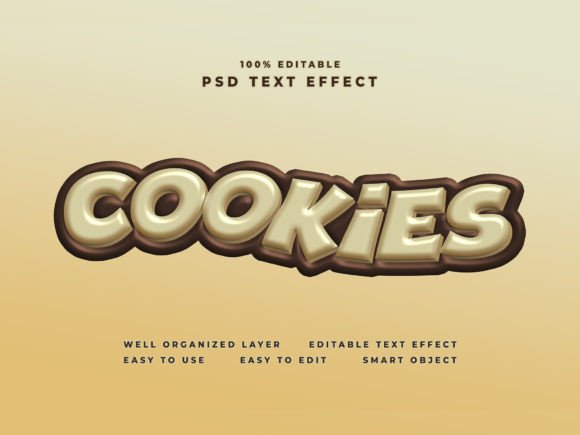
Cookies Text Effect: Turn Any Design into a Cool Visual in Seconds
Creating eye-catching text effects can feel like a skill reserved for experienced graphic designers. You might assume you need hours of practice, complex layer styles, or a deep understanding of blending modes to get that polished look. But what if you could achieve professional results with just a few clicks? That is exactly what the Cookies Text Effect offers—a straightforward way to present your text, shape, or logo in a cool style without the usual learning curve. You simply place your design into a smart object, and everything else is handled for you.
This approach changes how you think about design resources. Instead of starting from a blank canvas and building effects manually, you work with a pre-built template that does the heavy lifting. Whether you are creating a poster, flyer, Facebook cover, YouTube cover, website banner, cinematic title, or movie title, the process remains the same. Drop in your content, and the effect applies instantly. Let us explore what makes this text effect useful, who can benefit from it, and how you can use it effectively in your projects.
What Exactly Is Cookies Text Effect?
The Cookies Text Effect is a Photoshop template designed to give your text, shape, or logo a distinctive, stylish appearance with minimal effort. It comes as a well-organized PSD file with layers and folders already arranged for easy editing. The core idea is simplicity: you open the file, locate the smart object layer, double-click it, paste your design, save, and the effect is applied automatically.
The template works with Photoshop CC and offers a resolution of 4000 pixels high by 6000 pixels wide at 300 dpi. That means it is ready for both print and digital use in 4K quality. The package includes the main PSD file, preview images in JPG format, a PDF guide explaining how to use the template, and a help font file with font suggestions. Everything you need to get started is included in one download.
What makes this effect stand out is its balance between flexibility and ease of use. You are not locked into a single look. Because it relies on smart objects, you can swap out your content as many times as you like, experiment with different designs, and produce multiple versions of your project without rebuilding anything from scratch.
Why This Approach Matters for Beginners and Professionals Alike
For someone just starting out with design, the idea of creating a custom text effect can feel overwhelming. There are layer styles to learn, drop shadows to adjust, gradients to tweak, and textures to apply. The Cookies Text Effect removes that barrier by packaging all those decisions into a ready-made template. You do not need to know how each effect was built. You only need to know how to open a smart object and paste your design.
For experienced designers, the benefit is speed. If you work with multiple clients or manage several projects at once, you cannot afford to spend thirty minutes on every text effect. With this template, you can produce a consistent, high-quality result in under a minute. It is a practical shortcut that frees up your time for other creative decisions—choosing colors, refining typography, or composing the overall layout.
In both cases, the template supports your goals without demanding technical expertise. It is a tool that adapts to your skill level, not the other way around.
Who Will Find Cookies Text Effect Most Useful?
This resource is designed for a wide range of users, from hobbyists to small business owners. If you have ever needed a quick way to make a title or logo look more polished, this template can help. Here are some examples of people who benefit from it:
- Freelancers and creatives who produce social media graphics, YouTube thumbnails, or promotional banners and need a fast, reliable effect that looks professional every time.
- Small business owners and entrepreneurs who handle their own marketing materials and want their brand to appear consistent and well-designed without hiring a designer for every asset.
- Bloggers and content creators who want their website headers, video titles, or channel art to stand out with minimal effort.
- Educators and hobbyists who are learning Photoshop and want to build confidence by creating impressive results right away, even before mastering advanced techniques.
- Marketers who need to produce campaign visuals quickly and maintain a consistent look across different formats and platforms.
The common thread among these users is a need for efficiency without sacrificing quality. They do not want to spend hours learning a complex workflow. They want a practical solution that delivers results, and that is exactly what the Cookies Text Effect provides.
Practical Ways to Use Cookies Text Effect in Real Projects
The versatility of this template comes from its resolution and the clean, editable structure. Because it supports 4K quality at 300 dpi, you can use it for both digital screens and print materials. Here are some realistic use cases where the effect can make a noticeable difference:
Social Media and Channel Graphics
If you run a YouTube channel, a Facebook page, or an Instagram profile, you need graphics that grab attention in a crowded feed. The Cookies Text Effect works well for channel banners, video thumbnails, cover photos, and profile headers. Instead of spending time designing a new effect for each post, you use the same template with different text or logo variations. Your brand stays recognizable, and your visuals remain consistent across platforms.
Promotional Materials and Advertising
For flyers, posters, and digital ads, the way your headline looks matters. A strong text effect can draw the eye and communicate professionalism. Whether you are promoting an event, a sale, or a new product, you can use this template to make your main message stand out. Because it is based on smart objects, you can update the text or logo for different campaigns without recreating the entire design.
Website and Blog Headers
Your website header is often the first thing visitors see. Using the Cookies Text Effect for your site title, tagline, or page headings adds a layer of polish that makes your site feel more complete. It works particularly well for creative portfolios, personal blogs, or small business sites where you want to establish a strong visual identity from the start.
Cinematic and Video Titles
If you produce videos for work or as a hobby, having a stylish title sequence or lower third can elevate the production value. The template is designed to support cinematic titles and movie-style text. You can use it for intro cards, end screens, or any on-screen text that needs to look bold and intentional.
Key Features That Make Editing Truly Easy
Several practical features make the Cookies Text Effect straightforward to use. Understanding these helps you get the most out of the template from the very first try.
- Well-organized layers and folders keep everything structured, so you know exactly which layer to edit and which to leave untouched.
- Smart object editing means you never have to worry about breaking the effect. You simply replace the content inside the smart object, and the template applies the styling automatically.
- High resolution at 4000 by 6000 pixels ensures your output is sharp for both print and screen use. You can scale down for digital projects or print at high quality without losing detail.
- 300 dpi resolution makes the file print-ready. If you ever need physical materials like posters or flyers, your text will look crisp.
- Included preview files and instructions reduce guesswork. The PDF guide walks you through the process step by step, and the JPG previews show you what the finished effect looks like.
- Font help file provides suggested fonts so you can match the intended style without searching for alternatives.
These features work together to create a predictable, repeatable workflow. Once you have used the template once, you can reuse it for any future project that needs the same visual style.
What to Consider Before Using Cookies Text Effect
While the template is designed to be beginner-friendly, there are a few practical points to keep in mind. First, you need access to Photoshop CC or a version that supports smart objects. The file format is PSD, so you need compatible software to open and edit it.
Second, the template works best when you already have your text, shape, or logo prepared. The editing process is fast, but you get the best results if your content is clean, well-sized, and ready to place into the smart object. If you plan to use custom fonts, make sure they are installed on your system before you begin.
Third, consider the context where you will use the final output. The effect is designed to be versatile, but every project has unique requirements. Test the template with a sample of your content first to see how it looks at different sizes and on different backgrounds. This small step can save you time later.
Finally, remember that templates are starting points. The Cookies Text Effect gives you a strong foundation, but you can still customize it further once you are comfortable. You can adjust colors, add overlays, experiment with blending modes, or combine it with other effects. The template handles the hard part, so you have room to explore.
Why This Template Stands Out Among Design Resources
There are many text effect templates available online, but not all of them deliver on ease of use. Some require you to edit multiple layers, install specific plugins, or follow complex instructions. The Cookies Text Effect keeps things simple. The entire editing process revolves around one smart object. You open it, paste your design, and you are done.
This simplicity does not come at the cost of quality. The high resolution and 4K support mean your output is suitable for professional use. The organized file structure makes it easy to navigate, even if you are not familiar with Photoshop layers. And the inclusion of preview files and instructions ensures you never feel lost.
For anyone who has ever struggled to create a cool text effect from scratch, or for designers who want to speed up their workflow without compromising on visual appeal, this template offers a practical solution. It bridges the gap between wanting a polished look and having the time or skill to build it manually.
Whether you are designing a poster for a local event, updating your YouTube channel art, or creating a banner for your business website, the Cookies Text Effect gives you a reliable starting point. You focus on your content—the message, the brand, the creative idea—and let the template handle the presentation.