Geometric Facebook Cover Design Made Simple
When you scroll through Facebook, the first thing people notice is your cover photo. It sets the tone for your entire page. A geometric Facebook cover uses clean lines, repeating shapes, and balanced patterns to create a modern, polished look. Unlike a random photo or a basic gradient, geometric designs feel intentional and professional. They work well for personal profiles, business pages, portfolios, and brand presences. Whether you are a beginner exploring design for the first time or a seasoned creator looking for a reliable template, a geometric cover can save you hours while delivering a result that looks custom-made.
What is a Geometric Facebook Cover
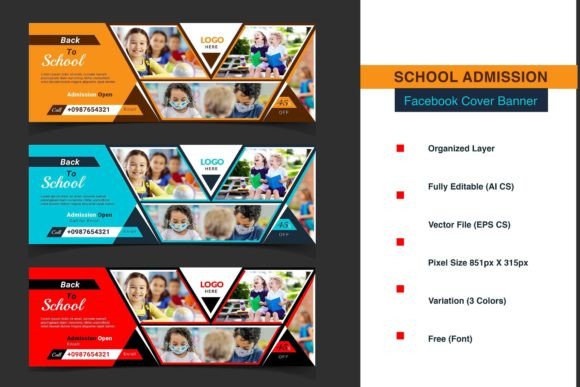
At its core, a geometric Facebook cover is a graphic built from shapes like triangles, hexagons, circles, or abstract polygons. These elements are arranged in a pattern that covers the full 851 by 315 pixel space. The result is visually striking but not chaotic. The geometry creates structure, which helps guide the viewer’s eye naturally across the banner. Because the design is based on repeatable vector shapes, it can be scaled, recolored, or rearranged without losing quality. This makes geometric covers especially versatile for both personal and commercial use.
For a designer, this means you can start with a solid framework and then adapt it to match a brand palette, a season, or a campaign theme. For someone with no design background, the template does the heavy lifting. You simply replace placeholder images or text, and the geometry handles the rest. The result is consistent, professional, and easy to update whenever you need a fresh look.
Why Different Audiences Care About Geometric Cover Templates
A single product can serve many people in different ways. A geometric Facebook cover template might matter to a small business owner because it saves time and guarantees a branded look. A blogger might appreciate that the template works with both Photoshop and Illustrator, so they can use whatever software they already own. A marketer might value the editable vector files because they can reuse shapes across social channels, creating a cohesive visual identity. An educator might find the template useful for teaching layout principles. Each person approaches the same resource with different priorities, and a good template accommodates all of them.
Beginners often worry about getting started. They may not know how to align shapes or choose colors that work together. A template removes that guesswork. The elements are already organized in neatly labeled layers. You can open the file and immediately see how the design is built. That transparency is educational on its own. Experienced users, on the other hand, want speed and flexibility. They need a file that responds well to heavy customization. The PSD and AI formats, along with the EPS fallback, give professionals the freedom to push the design in new directions without starting from scratch.
For Creators and Freelancers
If you create social media graphics for clients, a geometric template can become a reliable part of your workflow. You can use the same base structure to produce multiple variations for different clients. Change the color scheme, swap out the placeholder photo, adjust the typography, and export. The time saved on layout can be reinvested in refining the details that make each project unique. The fully customizable nature of the template means you are not locked into one look. You can rotate shapes, change opacity, add gradients, or combine elements from different layers.
Freelancers also appreciate the editable vector format. Vector shapes scale without pixelation. If a client later wants the same design for a YouTube banner or a LinkedIn header, you can adapt the existing file rather than rebuilding it. That kind of reliability keeps your workflow efficient and your clients happy.
For Small Business Owners and Entrepreneurs
As a business owner, your Facebook page is often the first place potential customers learn about you. A generic cover photo can make a business look small or unprofessional. A geometric cover, on the other hand, signals that you pay attention to detail. You do not need to be a designer to use it. The template includes clear instructions for both Photoshop and Illustrator. If you use Photoshop, you simply double-click the replace layer and insert your image. If you use Illustrator, you drag your image onto the placeholder, select both, right-click, and choose Make Clipping Mask. These steps take less than a minute.
For an entrepreneur juggling multiple tasks, that speed matters. You can update your cover photo seasonally, for a product launch, or to reflect a new brand direction without hiring a designer. The RGB color mode and 72 DPI resolution are already optimized for screen use. You do not need to worry about technical specs. The template handles them.
For Marketers and Publishers
Consistency is a cornerstone of effective branding. When your Facebook cover uses the same geometric language as your Instagram posts, website header, or email newsletter, your audience starts to recognize you instantly. Marketers value templates that are easy to replicate across platforms. The vector nature of this template means you can export pieces of the design as standalone graphics for other uses. That is not always possible with raster-based templates, where extracting an element may require reworking the entire file.
Publishers who manage multiple pages or client accounts also benefit from the organized layers. When you have a deadline, opening a file where everything is labeled clearly reduces friction. You know exactly which layer holds the background pattern, which layer holds the text, and which layer holds the image placeholder. That clarity saves mental energy and reduces errors.
For Educators and Hobbyists
If you teach design classes or workshops, a geometric cover template can serve as a hands-on learning tool. Students can open the file and see how a professional layout is structured. They can experiment with color changes, shape placement, and typography without needing to build everything from scratch. This lowers the barrier to entry and lets them focus on design principles rather than technical setup.
Hobbyists who enjoy experimenting with visual art may find geometric patterns satisfying to work with. The symmetry and repetition of shapes can be meditative. You can spend time tweaking the pattern, trying different color combinations, or overlaying textures. The template becomes a creativity playground, not just a utility.
Practical Examples for Different Reader Types
Imagine a freelance graphic designer who lands a client in the fitness industry. The client wants a bold, modern Facebook cover that shows energy. The designer opens the AI file, changes the geometric pattern to use high-contrast hexagons in orange and dark gray, replaces the placeholder with an action shot, and adds bold sans-serif text. The whole process takes under twenty minutes. The client approves on the first round because the geometry already feels dynamic.
Now consider a local bakery owner who wants to update their page for the holiday season. They open the PSD file, double-click the replace layer, paste a photo of their holiday display, and change the accent color from blue to warm red. They do not need to understand layers, clipping masks, or vector math. The template guides them. The result is a cover that looks festive and cohesive.
For a marketing coordinator managing three different brand pages, the same template can be duplicated and modified for each brand. One brand might use a minimalist triangle pattern in pastel tones. Another might use a dense polygon layout in bright colors. The underlying structure remains the same, but the output looks distinct. That kind of flexibility is hard to achieve with pre-made static images.
How to Decide if a Geometric Facebook Cover Template is Right for You
Your choice should match your skill level, your goals, and the tools you already use. If you own Photoshop or Illustrator and you have basic familiarity with layers, you can use this template immediately. The instructions provided are straightforward. If you are a beginner who has never opened either program, you may need to watch a short tutorial on clipping masks or layer replacement. The template itself is not complicated, but a little foundational knowledge helps you get the most out of it.
Consider your long-term needs. If you update your Facebook cover frequently, a template gives you a repeatable system. You can save the base file and create new versions by swapping images and tweaking colors. If you are building a brand that will expand to other platforms, the vector format supports that growth. If you only need one cover and you do not plan to change it, you can still use the template to craft a polished result in less time than designing from scratch.
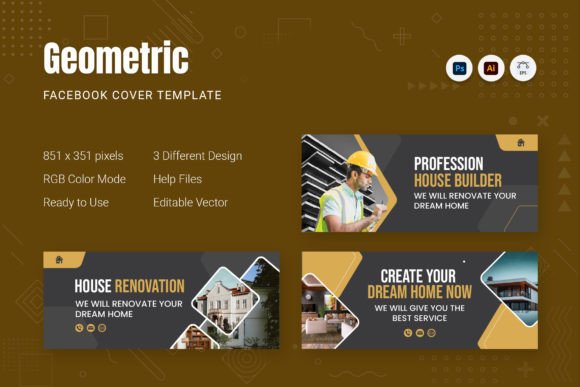
Quality is another factor. The 851 by 315 pixel resolution at 72 DPI is standard for Facebook covers. The RGB color mode ensures your colors display accurately on screens. The editable vector shapes mean you are not stuck with a flattened image that falls apart if you try to resize it. These technical details matter for anyone who values reliability and longevity.
Finally, consider the learning value. Even if you are experienced, studying how a well-organized template is constructed can introduce you to new workflows. Seeing how someone else sets up layers, groups shapes, and prepares placeholder elements might inspire you to refine your own file structure. For beginners, the template is a low-risk way to practice design skills while producing a usable asset.
Key Strengths at a Glance
- Adobe Photoshop and Illustrator files included – you can work in your preferred environment.
- EPS format for backup – useful for opening in other vector applications.
- 851 x 315 pixel canvas – matches Facebook’s exact cover dimensions.
- RGB Color Mode at 72 DPI – optimized for digital display.
- Fully customizable elements – shapes, colors, text, and images can all be edited.
- Neatly organized layers – reduces confusion and speeds up editing.
- Editable vector graphics – scalable without quality loss.
- Read Me note for free fonts – ensures typography remains consistent.
- Placeholder for photos – quick replacement method in both programs.
Balancing Creativity and Practicality
A geometric Facebook cover sits at the intersection of art and utility. It is a visual statement, but it is also a functional piece of your online presence. The template approach respects both sides. It gives you a proven layout so you do not have to invent structure from zero. At the same time, it leaves room for your own choices: which image to feature, which colors reflect your personality or brand, which font matches your tone. The result is a cover that feels personal but looks professional.
For many users, the biggest hurdle is not lack of creativity. It is lack of time or lack of technical confidence. A template addresses both. It shortens the path from idea to finished graphic, and it shows you a working example of good design. Over time, as you become more comfortable, you might find yourself relying less on the default layout and more on the modular elements. That growth is exactly what a good template should support.
Final Thoughts on Choosing Your Cover
Your Facebook cover is one of the most visible parts of your online identity. Investing a small amount of time into making it intentional pays back in credibility and recognition. A geometric design is a smart choice because it ages well. Trends come and go, but clean geometry remains readable, modern, and adaptable. Whether you are a blogger, a business owner, a teacher, or a creator, the right template lets you achieve that look on your own terms.
Look for a template that matches the software you already use, gives you room to customize, and includes clear guidance. The one described here checks those boxes with PSD, AI, and EPS formats, organized layers, and straightforward replacement instructions. It is built for people who want professional results without a steep learning curve. That combination of accessibility and quality is what makes a geometric Facebook cover template a resource you can return to again and again.