Business Conference Social Media Post: Elevate Your Event Graphics
Creating a strong visual presence for your business conference is essential in today’s digital-first world. Whether you’re promoting a keynote speaker, announcing panel discussions, or sharing registration links, the graphic you post on social media often determines whether someone stops scrolling or keeps going. A polished, professional image builds trust, communicates your event’s value, and helps you stand out in crowded feeds. That’s exactly why a ready-to-use Business Conference Social Media Post template can be such a valuable asset. Instead of starting from scratch with every new event, you get a clean, creative design that you can adapt in minutes.
This article walks you through what this type of template offers, how to use it, who should consider it, and what to keep in mind when customizing it for your own conference or event.
What Is a Business Conference Social Media Post Template?
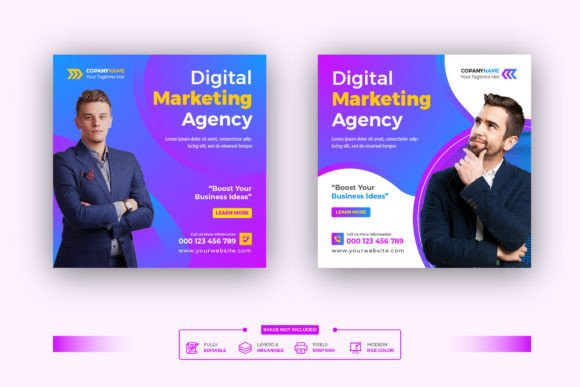
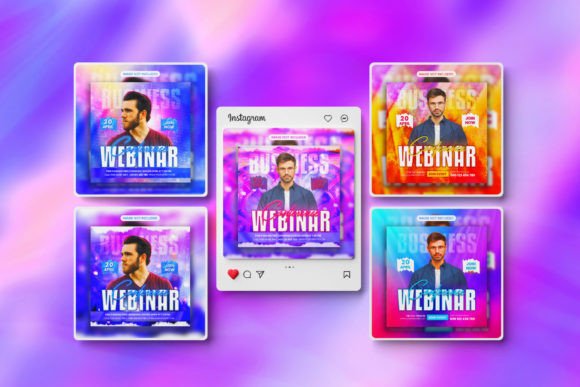
A Business Conference Social Media Post template is a pre-built Photoshop file designed specifically for promoting professional gatherings. It comes with all the graphic elements already arranged—background, text placeholders, color schemes, and imagery—so you only need to drop in your own content. In this case, the product includes five Adobe Photoshop files in 72 DPI resolution with an RGB color mode and a square 1080×1080 pixel dimension, perfect for platforms like Instagram, Facebook, and LinkedIn.
The template is built for Adobe Photoshop CC, and despite its professional look, it requires only basic knowledge to edit. You can change the text, swap out images, adjust colors, and move elements around without needing advanced design skills. A help guide is included inside the main file, and if you need specific fonts, a free download link is provided as well. The creator also offers support for customization, so you aren’t left alone if something doesn’t work as expected.
Key Features and Benefits of This Business Conference Social Media Post
- Easy Customizable and Editable: The layers are clearly named and organized. You can quickly replace placeholder text with your conference title, date, location, and call‑to‑action. Changing images is as simple as dragging a new photo into the appropriate layer.
- Five Photoshop Files: Five distinct designs give you variety across multiple posts or different event segments. You can maintain a consistent look while changing the message—for example, one post for the agenda, another for a speaker spotlight, and another for a registration reminder.
- 72 DPI Resolution & RGB Color Mode: These settings are ideal for digital screens. Your graphics will look crisp on mobile devices, desktop monitors, and social media feeds without unnecessary file size.
- 1080×1080 Pixel Dimension: This is the standard square size for most social media platforms. It works well as an Instagram post, Facebook feed image, or LinkedIn update. You can also crop or resize it for other formats with minor adjustments.
- Help Guide Included: Even if you’re new to Photoshop, the included guide walks you through the editing process step by step. This removes guesswork and helps you get professional results quickly.
- Free Fonts with Download Link: Typography can make or break a design. The template uses fonts that are freely available, and the download link is provided in the main file. No need to purchase expensive typefaces.
- Creator Support: If you run into trouble or need a special customization, you can reach out via the creator’s profile. This adds a layer of reliability, especially for time‑sensitive event promotions.
How to Edit and Customize the Template
Editing the Business Conference Social Media Post requires Adobe Photoshop CC and a very basic comfort level with the software. Here is a typical workflow:
- Open the file: Double‑click the downloaded .psd to launch it in Photoshop. You’ll see layers grouped by type—background, text, images.
- Change the text: Select the text layer and use the Type tool to rewrite the headline, subheading, and any other copy. The fonts are already embedded or linked, so they apply automatically. Use the free font download if your system doesn’t have them installed.
- Replace images: Right‑click on a smart object layer (often labeled “Image Here” or “Place Your Photo”) and choose “Replace Contents.” Navigate to your own conference photo or graphic, and Photoshop will adjust it to fit the frame.
- Adjust colors: Use adjustment layers or simply change the fill color of shape layers to match your brand palette. The template’s color scheme is neutral and professional, but you can easily make it your own.
- Save for web: Once you’re satisfied, save the file as a JPEG or PNG (File > Export > Save for Web). Use the 1080×1080 dimension to upload directly to your social media accounts.
The included help guide provides more detailed instructions, especially for beginners. If you ever feel stuck, remember that the creator is available for support.
Where Can You Use These Social Media Posts?
The Business Conference Social Media Post template shines in digital marketing scenarios. Because of its 1080×1080 square format and RGB color mode, it is primarily intended for online use. Here are the most common applications:
- Facebook Cover & Posts: Use one design as your event’s Facebook cover photo, then create a series of square posts for the feed to announce speakers, share behind‑the‑scenes content, or post countdown reminders.
- Instagram Posts & Stories: Instagram’s square format matches perfectly. Post a high‑impact visual, tag your speakers and sponsors, and include a strong call‑to‑action in the caption. The template’s clean layout helps your message stand out even on small screens.
- LinkedIn Banners & Updates: A professional conference graphic fits naturally on LinkedIn. You can use the template to create a banner for your company page or share an update from your personal profile. The polished look signals that your event is well‑organized.
- Event Listing Pages: Many conference platforms (Eventbrite, Meetup, etc.) allow you to upload a square image for your event thumbnail. A cohesive design across platforms builds recognition and credibility.
- Email Headers & Newsletters: While the 72 DPI resolution is optimized for web, you can also use the graphic inside email marketing campaigns. Just ensure your email client doesn’t resize it awkwardly—1080×1080 is generally safe for hero images.
Keep in mind that 72 DPI is not suitable for high‑quality print materials like banners or large posters. For printed items, you would need a separate file with higher resolution. However, for all digital touchpoints, this template works perfectly.
Who Can Benefit from This Business Conference Social Media Post?
This product is designed with a wide audience in mind. Whether you’re a solo entrepreneur organizing a small workshop or a marketing team handling a large industry summit, the template can save time and ensure a professional appearance.
- Event Organizers & Planners: If you run multiple conferences a year, you need a fast way to produce consistent graphics. The five different files allow you to maintain a unified visual identity without designing each post from scratch.
- Small Business Owners: Not every small business has a dedicated graphic designer. With this template, you can create conference promotions yourself in a few minutes, freeing up budget and resources for other tasks.
- Marketing Professionals: Even experienced designers can benefit from a starting point. The template’s clean layout and organized layers speed up the workflow, especially when you’re juggling multiple campaigns.
- Freelancers & Creators: If you offer social media management or event marketing as a service, this template can serve as a base for client projects. You can customize it with different branding and reuse it across various clients.
- Non‑Profit & Community Organizations: Budget constraints often limit graphic design. A low‑cost, editable template helps you produce conference announcements that look just as polished as those from larger organizations.
Practical Tips for Getting the Most Out of the Template
To make your Business Conference Social Media Post truly effective, keep these pointers in mind:
- Stick to your brand colors: The template comes with a professional, neutral palette, but you should adjust it to match your company or event brand. Consistency across posts builds recognition.
- Use high‑quality images: The template lets you swap photos easily. Choose clear, well‑lit images that reflect the professional nature of your conference. Avoid low‑resolution or cluttered pictures.
- Keep text minimal: Social media users scan quickly. Use concise headlines (conference name, date, location) and a single call‑to‑action (e.g., “Register Now”). Let the visual elements do the heavy lifting.
- Test on different devices: Although 1080×1080 is standard, preview your post on both mobile and desktop to ensure text is readable and the design isn’t cropped awkwardly.
- Create a series: With five files at your disposal, plan a sequence of posts leading up to the event. For example, reveal the date first, then the keynote speaker, then the agenda, then a reminder. This builds anticipation and keeps your conference top‑of‑mind.
- Engage with your audience: The template is only the visual part. Pair it with a compelling caption that encourages comments, shares, or clicks. Ask a question related to the conference topic, or offer an early‑bird discount code.
Considerations and Limitations
No product is perfect for every situation, and being aware of the limitations helps you decide if this template is right for your project.
- Requires Photoshop basics: While the template is easy to edit for someone familiar with layers and text tools, absolute beginners may need to spend a little time learning. The help guide mitigates this, but the learning curve exists.
- 72 DPI is screen‑only: If you plan to print flyers, banners, or signage, you will need a separate higher‑resolution file. This template is strictly for digital use.
- Square format only: 1080×1080 works great for Instagram and Facebook, but if you need vertical (e.g., Pinterest or Instagram Stories) or horizontal (e.g., Twitter header) formats, you will have to crop or resize, which might alter the composition. You may need to create additional variations from scratch.
- Adobe Photoshop CC required: The file won’t open in older versions or other software like GIMP without conversion issues. Make sure your software is up‑to‑date.
- Font availability: Even though the fonts are free, they need to be installed on your computer. The download link is provided, but it’s an extra step. If you skip it, Photoshop may substitute a different font, which could change the design.
Despite these points, the template remains an excellent solution for the vast majority of digital event promotion needs. The support offered by the creator further reduces the risk for buyers who might worry about technical issues.
Conclusion
A Business Conference Social Media Post template is more than just a pretty design—it’s a practical tool that saves time, ensures consistency, and helps you present your event in the best possible light. With five ready‑to‑edit Photoshop files, clear instructions, free fonts, and direct support from the creator, it provides almost everything you need to launch a professional series of social media graphics. Whether you’re promoting a local meetup or an international conference, the template adapts to your brand and message with minimal effort.
If you’re looking to elevate your event’s online presence without investing hours in design work, this product is well worth considering. Start by reviewing the help guide, experiment with the layers, and create a set of posts that truly represent the quality of your conference. And remember, if you ever need assistance, the creator is just a message away. For feedback or questions, feel free to contact the creator via the profile. If you find the template useful, rating it helps others make informed decisions too.