Lawn Garden Services Social Media Post – A Practical Tool for Business Visibility
When you run a lawn care or garden service business, your social media presence needs to look as polished as the yards you maintain. A Lawn Garden Services Social Media Post template gives you a head start on creating visuals that actually stand out in a crowded feed. Instead of starting from scratch every time you want to share a promotion, before-and-after photo, or seasonal tip, you open a file that already has the layout, color balance, and typography sorted. That means less time fiddling with design software and more time focusing on your actual work.
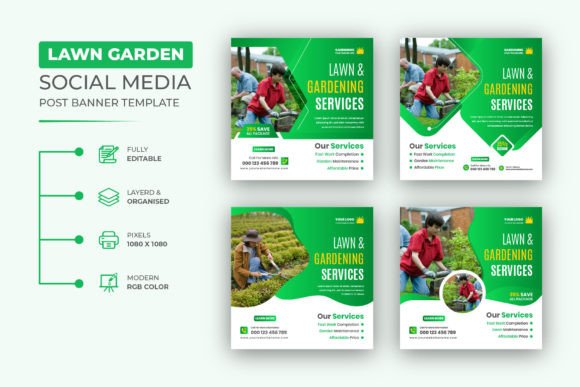
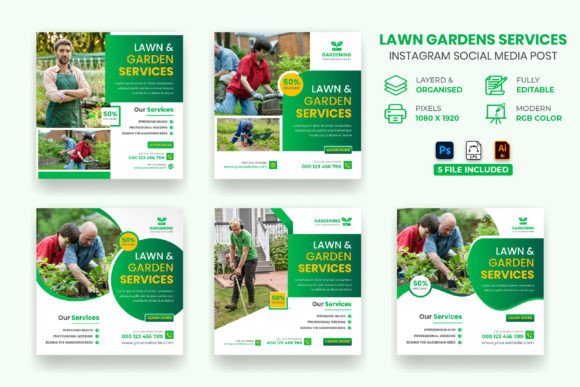
This particular set comes with five files each in Photoshop, Illustrator EPS, and Illustrator AI formats, all at 1080x1080 pixels and 72 DPI. It is built for RGB color mode, which matters because screens display RGB, not CMYK. The template is designed to be edited by anyone who knows the very basics of Illustrator or Photoshop. You do not need to be a professional graphic designer to swap text, change images, or tweak colors. A help guide is included, and the font used is free, with a download link inside the main file.
Where and Why You Might Use This Template
Social media moves fast, and a generic post rarely stops anyone from scrolling. A visually cohesive post, on the other hand, signals professionalism and reliability. For a lawn or garden business, that can be the difference between a potential client clicking “learn more” or passing by.
Imagine you run a small lawn mowing service in a suburban area. You want to post a spring kickoff offer. Instead of snapping a photo of your equipment and writing a caption, you open the template, drop in a high-quality image of a freshly cut lawn, change the headline to “Spring Cleanup Special,” and adjust the colors to match your brand—green and earthy brown. In under fifteen minutes, you have a post that looks like it came from a marketing agency. You schedule it for Monday morning, and by Tuesday, you have three new inquiries.
Or picture a landscaping company that specializes in garden design. Your clients expect a certain aesthetic. A messy post with mismatched fonts and low-resolution images hurts your credibility. With this template, you can create a consistent series of posts showcasing different projects. One week you feature a patio renovation, the next a flower bed installation. The same base layout ties them together, so your feed looks intentional and professional. Potential clients browsing your page get the message: you care about details.
Realistic Use Cases Across Different Situations
Not every business posting about lawn and garden services is the same. The way you use this template depends on your specific goals and audience.
Seasonal Promotions and Service Announcements
Lawn care is highly seasonal. In spring, everyone wants aeration, seeding, and cleanup. In summer, it is all about mowing and weed control. Fall brings leaf removal and winterizing. Winter might mean snow removal or equipment storage. Each season calls for a different message. Instead of designing four separate templates from scratch, you use this one file and adapt it. Swap the image, change the headline, update the call to action. Your followers recognize the visual style, so they know the post is from you. That builds recognition over time.
Before and After Transformations
Few things convince a potential client like a dramatic before-and-after shot. A patchy, overgrown lawn turned into a lush green carpet speaks louder than any service description. With this template, you can create a split image layout or place two photos side by side. Add a short headline like “From neglected to pristine” and your logo. Post it, and let the results do the selling. People love seeing tangible proof of what you do.
Customer Testimonials and Reviews
Social proof matters. A glowing review from a happy homeowner can be turned into a post using this template. Pull a quote from your latest Google review, pair it with a photo of the property you worked on, and format it within the template. It looks less like a screenshot of a text review and more like a professional testimonial. Tag the customer if they are comfortable with it. That small gesture often leads to more engagement and shares.
Educational Tips and Seasonal Advice
People follow lawn and garden accounts not only because they need services but also because they want to learn. You can use the template to share quick tips—how often to water in summer, when to fertilize, how to spot grub damage. These posts position you as an expert, not just a service provider. Over time, when someone does need professional help, they think of you first. The template keeps these tips visually consistent with your promotional posts, so your feed does not feel scattered.
Brand Building for Freelancers and Solo Operators
If you are a one-person operation, you might not have a dedicated marketing budget. Every dollar counts. A template like this gives you a way to look established without spending hundreds on a designer. You tweak the colors, add your logo, and start posting. Over several months, your audience sees a polished, coherent brand identity. That builds trust. When a homeowner compares you to a competitor who posts random, low-quality images, you win simply by looking more credible.
Who Benefits Most from This Template
The obvious user is the owner of a lawn care or landscaping business. But the audience is broader than that.
Social media managers who handle multiple local service clients will find this template useful because it saves time and ensures consistency across campaigns. Instead of building each post from scratch, they modify the same base design for different clients, swapping colors and logos. The help guide included in the file reduces back-and-forth questions, especially if the client wants to make their own edits later.
Freelance designers who serve small businesses can also use this as a starting point for client projects. It gives them a solid foundation that they can customize further, reducing turnaround time. The file supports Illustrator and Photoshop versions CC, which covers most modern workflows.
Marketers running paid ads on Facebook or Instagram need visuals that meet platform specifications. The 1080x1080 pixel dimension is standard for square feed posts and works well for Facebook covers when adjusted. Having a ready-to-edit file means you can test different headlines and images quickly without redoing the layout each time.
Even hobbyists who run a small side gig—like a weekend mowing service or a garden consulting hobby—can use this template to look more serious than they might otherwise appear. A polished post can make a side business feel like a real business, which helps when asking for referrals or pricing higher than the competition.
What to Consider Before Using or Buying
No template is a magic solution. You still need to put in the work on content and strategy. But there are a few practical things to keep in mind before you download and start editing.
First, you need access to Adobe Illustrator or Adobe Photoshop. The files are native to those programs. If you only have free or online editing tools, you might struggle to edit the AI or PSD files effectively. The template is designed for people who already have some familiarity with these tools. The product description says you need “the very basics of Illustrator” to change text, color, and images. That is accurate. If you have never opened Illustrator before, the help guide will walk you through the basics, but you should expect a short learning curve.
Second, consider your brand colors and fonts. The template uses a free font, and the download link is provided inside the file. If you already have a brand font, you can substitute it. But if you do not have a brand kit yet, this template gives you a chance to establish one. Pick two or three colors that represent your business—maybe deep green, warm brown, and off-white—and use them consistently across every post you create from this template. That consistency is what makes the investment worthwhile.
Third, think about image quality. The template is set at 72 DPI, which is standard for screen use. But the photos you place into it need to be high resolution. A blurry or pixelated image will drag down the entire post, no matter how good the layout is. Take clear photos of your work in good lighting. If you do not have your own images, consider using stock photos that match the kind of work you do. But authentic photos of your actual projects will always perform better with local audiences.
Lastly, remember that a template is a starting point, not a substitute for thinking about your audience. A post that looks great but says nothing useful will not get engagement. Pair the template with a strong caption that answers a question, solves a problem, or tells a story. That combination—good design plus useful content—is what grows a following and generates leads.
Connecting Features to Real Outcomes
It is easy to list file formats and resolution numbers and call it a day. But those features matter because of what they let you do in real situations.
The fact that you get five files each in PSD, EPS, and AI means you are not locked into one workflow. If your designer uses Illustrator and you prefer Photoshop, both are covered. If you ever need to send a file to a printer or a colleague who uses a different system, having multiple formats avoids compatibility headaches. That flexibility saves time when you are under deadline for a seasonal promotion.
The 1080x1080 pixel dimension fits Instagram and Facebook square posts perfectly. But it also works for Facebook covers when you adjust the layout slightly. That means you can use the same base design for both your profile and your feed, creating a unified look across your entire page. Potential clients who visit your profile see a consistent brand identity immediately.
The help guide is more useful than many people realize. When you are trying to edit a file at 9 PM on a Sunday because you want to schedule a post for Monday morning, the last thing you want is to hunt for tutorials. A guide that walks you through the basics inside the file itself saves frustration. It also reduces the chance that you break the layout by accident.
The free font included via download link removes the worry about licensing. You are not using a pirated font or guessing whether you are allowed to use it commercially. The font is free to use, which means your posts are legally clean. That matters if you ever run ads or if a client asks for the source file later.
A Few Final Thoughts on Making It Work
This template is a practical tool for anyone who needs to post about lawn, garden, or outdoor services on social media. It does not replace a good strategy, but it removes a common barrier: the time and skill required to create a professional-looking visual from scratch. If you already know how to do basic edits in Illustrator or Photoshop, you can have a post ready in under twenty minutes. If you are still learning, the included guide gets you started without needing to search YouTube for separate tutorials.
The businesses that get the most value from this template are those that use it consistently. Post once a week with a clear message, stay on brand, and pay attention to what your audience responds to. Over time, you build a library of posts that show your range, your expertise, and your reliability. That is how a template like this moves from being a simple design file to being part of a working marketing system.
If you are considering whether to buy it, think about how many hours you spend on social media graphics each month. If that number is more than a few, the template likely pays for itself in time saved on the very first use. And if you ever need help customizing it further, the seller offers support through their profile. That kind of backup is rare with cheap design assets and adds peace of mind.
Rate the item if it works well for you. That feedback helps other business owners make the same decision and encourages sellers to keep producing useful templates. In a market where everyone is competing for attention, a small investment in better visuals can make a real difference to how your lawn and garden services are perceived.