Pixelist – Photography Powerpoint
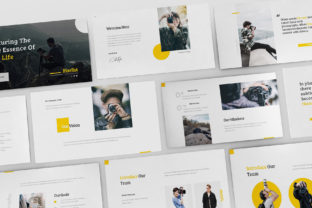
Presenting photography work often feels like walking a tightrope. You want the images to breathe, the story to land, and the vibe to match your creative voice—all while keeping a room of clients, collaborators, or jurors engaged. That’s a lot of pressure for a deck. The Pixelist – Photography Powerpoint template was built to handle that pressure without you having to wrestle with design decisions at the last minute. It’s a flat, clean, minimal, and modern presentation tool that lets your photos do the talking while the slides themselves stay out of the way. Whether you are pitching a brand campaign, presenting a wedding portfolio, or walking a gallery director through your latest series, this template gives you a professional frame that elevates your work rather than competing with it.
Walking into a client meeting with confidence
Imagine you have thirty minutes with a creative director at a boutique ad agency. They’ve seen your work on Instagram, but now they need to see how you think. You open your laptop and click through a deck that feels polished, consistent, and modern—without looking like every other template out there. That’s the kind of moment the Pixelist – Photography Powerpoint was designed for. With 35 unique slides, you can show a range of work, talk through your process, and even include a few behind-the-scenes shots without breaking the flow. The overlay picture effect helps images transition smoothly, so your portfolio doesn’t feel like a static slideshow—it feels like a narrative. And because the template is fully animated, you control the pace. Pause on a powerful image. Let the text fade in. Keep the room exactly where you want them.
For photographers who pitch regularly, this kind of flexibility matters. You aren’t just showing pictures. You are building a case for why you are the right person for the job. The template’s resizable vector elements mean that if you want to highlight a specific part of an image—say, a texture or a color palette—you can add simple graphic cues without hiring a designer. Everything aligns, everything scales, and everything stays crisp on a retina or Full HD screen. That professional polish does not go unnoticed.
Building an online portfolio that feels like a gallery walkthrough
A PDF portfolio has its place, but an animated, widescreen presentation can feel closer to the real experience of walking through a gallery. Freelance photographers, especially those working in fashion, editorial, or fine art, often need to send something that feels more intentional than a link to a website. The Pixelist – Photography Powerpoint template, available in both PPT and PPTX formats, lets you build a self-contained presentation that can be viewed offline, shared via cloud links, or even presented in person on a tablet. The 16:9 widescreen size matches modern monitors and projectors perfectly, so your images fill the screen edge to edge.
Think about the last time you received a portfolio PDF that was just a bunch of images crammed onto white pages. It felt flat. Now imagine opening a presentation where each image has space to breathe, where the typography (thanks to the included Bree Serif and Raleway free fonts) adds a subtle editorial feel, and where the overall design whispers professionalism without shouting. That’s the kind of impression that gets you a second look. The template also includes object placeholders, so you can drag and drop your images in seconds. No need to fiddle with alignment or image masks—the template handles that for you.
Wedding photographers who need to impress couples and planners
Wedding photography is deeply personal. Couples aren’t just hiring a photographer; they are hiring someone to capture one of the most important days of their lives. When you sit down with engaged clients, they want to feel your style, your warmth, and your reliability. A well-designed presentation can make that connection stronger. The Pixelist – Photography Powerpoint template is ideal for building a client-facing deck that shows full wedding stories, highlight reels, and even album designs. Because the slides are based on master layouts, you can create a consistent look across dozens of images without manually formatting each one.
Event planners and venue coordinators also appreciate a clean presentation when reviewing potential vendor collaborations. If you are pitching a styled shoot or a vendor team project, the template’s print-ready capability means you can produce physical leave-behinds that look just as professional as the digital version. The included icons and vector elements let you add small details—like a camera icon near a technical note or a heart icon for a favorite moment—without cluttering the design. It stays minimal, modern, and focused on the images.
One common consideration: wedding photographers often have a mix of portrait, detail, and wide-angle shots. The template’s overlay picture effect handles different aspect ratios nicely, so a vertical portrait doesn’t feel awkward next to a horizontal ceremony shot. You can trust that the layout adapts without warping or cropping your images unexpectedly.
Creative agencies and design studios
Agencies that handle photography campaigns—whether for real estate, hospitality, or product branding—need presentation tools that are both flexible and repeatable. The Pixelist – Photography Powerpoint template offers a pixel-perfect progressive design that works across multiple projects. If your studio shoots for a hotel chain, for instance, you can build a master deck with consistent branding, then swap out image sets for each property. The resizable vector elements make it easy to adjust colors and accents to match a client’s brand palette without rebuilding the entire template.
For internal reviews, the fully animated slides help keep meetings dynamic. Instead of flipping through static images, your team can watch a sequence that mimics the visual flow of the final campaign. This is especially useful when presenting mood boards, shot lists, or before-and-after edits. The template’s documentation and easy-to-use structure mean that even junior team members can pick it up quickly. That saves time and reduces the back-and-forth that usually happens when someone unfamiliar with design software tries to adjust a slide.
Educators, workshop leaders, and photography instructors
Teaching photography involves more than just explaining settings. You need to show examples, compare compositions, and walk students through your thought process. A presentation template that is clean and modern helps keep the focus on the learning, not on the slide design. The Pixelist – Photography Powerpoint template works well for educators who want to create lecture decks that are visually engaging without being distracting. The object placeholders let you quickly load in student work, comparison shots, or technical diagrams. And because the slides are based on master slides, you can create a consistent template for an entire semester’s worth of classes.
Workshop leaders at conferences or photography retreats often need to present in rooms with varying projector quality. The Full HD and retina-ready design ensures that images look sharp even on larger screens. The included PDF version gives you a backup option if the venue’s software doesn’t support PPTX files. That kind of flexibility is practical when you are on the road and don’t have time to troubleshoot technical issues.
Photography students building their first professional portfolio
Stepping out of school and into the professional world is a big transition. One of the first things potential clients or studios ask for is a portfolio. A student might have strong images but lack the design skills to present them in a way that feels mature. The Pixelist – Photography Powerpoint template bridges that gap. It gives students a professional framework so they can focus on curating their best work rather than learning layout software. The template’s easy-to-use nature and one-click image insertion make it accessible even for someone who has never built a presentation before.
For portfolio reviews, internships, or job applications, having a clean, animated deck can set a student apart from peers who submit simple PDFs or website links. The free fonts—Bree Serif and Raleway—give the presentation a contemporary feel without requiring any font purchases. And because the template includes both light and dark slide variations depending on the file chosen, students can match the mood of their work. A dark background might suit fine art or nighttime photography, while a light background works better for bright, airy portrait work.
One thing to keep in mind: images are not included in the template. That’s intentional. The template is a container, not a content library. You bring your own photography, which means every presentation is unique to you. The sample layouts and overlay effects are designed to showcase your work, not replace it.
Social media managers and content strategists
Photography isn’t just for portfolios anymore. Social media managers, content strategists, and marketing teams often need to create internal presentations to plan visual campaigns, review user-generated content, or pitch creative concepts to stakeholders. The Pixelist – Photography Powerpoint template works well for these internal use cases because it is clean enough for executive reviews yet flexible enough for team brainstorming. The resizable vector elements and icons make it easy to add notes, arrows, or callouts without making the slides feel busy.
For example, a content team planning a seasonal campaign might use the template to storyboard each week’s visual content. With 35 slides, there is room to show mood boards, sample images, caption ideas, and posting schedules—all in one consistent deck. The full animation capability means you can reveal information gradually during a presentation, keeping the audience focused on what matters in that moment. This is especially useful when presenting to clients who prefer to see the big picture before diving into details.
A few practical considerations before downloading
Before you grab the Pixelist – Photography Powerpoint template, it helps to know what you are working with. The template comes in four files plus a PDF, all sized at 16:9 widescreen. It works with both PowerPoint (PPT and PPTX) and includes documentation to help you get started. The free fonts—Bree Serif and Raleway—are easy to install and pair well together, giving your presentation a refined editorial feel.
One strength worth noting is the support. The template comes with free updates and free fast support via email or the profile page. That means if you run into a layout issue or want to know how to customize a specific element, help is available without extra cost. For professionals on tight deadlines, that reassurance makes a difference.
As for limitations: because the template is heavily image-focused, it works best when you have strong, high-resolution photos ready. If your images are small or low quality, even the best template cannot compensate. Also, while the overlay picture effect is stylish, it may not suit every photography style. If your work relies on precise color reproduction or minimal graphical interference, you might want to use the overlay sparingly. The template is modular enough that you can skip certain effects and still have a cohesive presentation.
Another thing to consider is the learning curve for animation. The slides come fully animated, which is great for in-person presentations. But if you plan to send the deck as a self-running file or upload it to a platform that doesn’t support PowerPoint animations, you might want to strip the animations or export as a video. The documentation covers this, so you aren’t left guessing.
In the end, the Pixelist – Photography Powerpoint template is a tool that respects your time and your work. It does not try to be flashy or complicated. It stays clean, modern, and professional, so your photography remains the center of attention. Whether you are pitching a six-figure campaign, teaching a workshop, or just putting together your first real portfolio, it gives you a foundation you can trust—without forcing you to become a slide designer first.