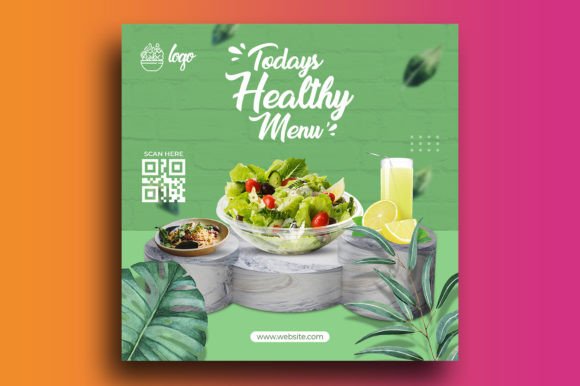
Healthy Menu Promotion Instagram Post Template Guide
If you run a café, restaurant, meal prep service, or food blog, you already know that social media is where your customers discover you. But creating polished, consistent visuals for every new menu item or seasonal special takes time—time you could spend cooking, planning, or engaging with your audience. That is where a Healthy Menu Promotion Instagram Post template becomes genuinely useful. It is not a magic solution, but a practical tool that helps you produce professional-looking content without needing advanced design skills or hours in front of a screen.
This particular template offers a clean, modern layout designed specifically for promoting healthy menu options. It comes as a single PSD file sized at 1080 by 1080 pixels, which is the standard square format for Instagram feeds. The file operates in RGB color mode at 300 DPI, meaning your posts will look sharp on mobile screens and maintain quality if you ever need to repurpose them for other digital uses. The template is optimized so that even if you only know the very basics of Photoshop—opening a file, selecting a text layer, typing new words—you can swap in your own content quickly. Images are not included, but the template is structured to let you drag and drop your own food photography or graphics into place.
Why a Template Changes How You Share Your Menu
Creating a single Instagram post from scratch involves choosing fonts, setting up a grid, adjusting spacing, picking colors, and aligning elements. Multiply that by every item on your healthy menu, and the effort adds up fast. A Healthy Menu Promotion Instagram Post template removes most of those decisions. The typography is already selected, the color palette is cohesive, and the layout has been tested for visual balance. You simply replace the placeholder text with your dish name, description, price, and any promotional details. Then you insert your photo. The result looks intentional and polished—exactly the kind of presentation that makes people stop scrolling and pay attention.
For small business owners, this means you can maintain a consistent brand presence across your feed without hiring a designer. A freelancer or solo entrepreneur can schedule a week of posts in one afternoon. A marketer managing multiple accounts can hand off the PSD file to a team member who has only basic Photoshop familiarity, knowing the output will be on-brand every time. The template essentially compresses the learning curve, letting you focus on the message instead of the mechanics.
Practical Benefits That Go Beyond Appearance
One of the strongest arguments for using a prepared template like this Healthy Menu Promotion Instagram Post is the time it saves. If you typically spend 20 to 30 minutes per post on layout and design, a pre-built PSD can cut that down to five minutes or less. Over a month, that could save you several hours—time you can redirect toward recipe development, customer communication, or improving your actual menu.
Another overlooked advantage is consistency. When every post follows the same visual structure, your feed becomes instantly recognizable. Regular followers will start associating that clean layout with your brand, which builds familiarity and trust. New visitors who land on your profile will see a cohesive grid rather than a random collection of images, which makes your business appear more professional and reliable.
The template also encourages better storytelling. Because the design is already arranged, you can focus on writing compelling descriptions that highlight what makes a dish healthy—fresh ingredients, nutritional benefits, dietary accommodations, seasonal sourcing. Instead of wrestling with font sizes and layer visibility, you spend your energy on the words and images that actually convince someone to visit your restaurant or order your meal prep service.
Who Gets the Most Value From This Template
This type of Healthy Menu Promotion Instagram Post template is especially useful for professionals and business owners who wear multiple hats. A café owner who also handles the social media account, a personal chef who wants to attract new clients, a health food blogger who publishes weekly menu highlights—each of these people needs to produce content regularly without it becoming a second job.
Marketers working with food brands will appreciate how easy it is to prototype a post before finalizing the photography or copy. Since the template is a layered PSD file, you can move elements around, test different text placements, or adjust the transparency of overlays to better suit your image. The free font requirement also means you can match the typography to your brand without worrying about licensing conflicts, as long as you source fonts that are free for commercial use.
Educators and workshop leaders teaching social media marketing or food branding can use this template as a teaching tool. It gives students a realistic asset to practice with—understanding layer organization, text formatting, and image placement in a context that mirrors real-world client work. Publishers and content creators who produce meal plans or healthy eating guides can adapt the template for different platforms, since the square aspect ratio works on Instagram, Facebook, and even Pinterest when used appropriately.
Realistic Use Cases and Workflow Integration
Imagine you are launching a new seasonal salad. With the Healthy Menu Promotion Instagram Post template, you open the PSD file, double-click the text layer for the dish name, and type “Harvest Kale & Quinoa Bowl.” You update the description to mention the roasted squash and tahini dressing. You adjust the price tag. Then you place a high-resolution photo of the finished bowl into the designated image area. You save a JPEG, and the post is ready. No guesswork, no alignment issues, no hunting for the right font size.
Another scenario: you run a weekly meal prep subscription. You can reuse the same template each week, simply updating the featured meal and any promotional call-to-action. Over time, your feed builds a consistent rhythm that signals reliability to your audience. Subscribers come to expect the weekly post, and newcomers see a clear pattern of value.
The template also supports seasonal promotions. If you offer a discount on smoothie bowls during summer, you can duplicate the PSD file, change the background color tint or swap the overlay style, and create a dedicated post that still feels tied to your main brand. The 300 DPI resolution means the file maintains crispness even if you later export it for a flyer or a web banner, giving you flexibility beyond Instagram.
Limitations and When to Compare Options
No template is a perfect fit for every situation, and this Healthy Menu Promotion Instagram Post is no exception. Because it is a single PSD file, you will need access to Adobe Photoshop. If you do not subscribe to Creative Cloud or use an alternative like Affinity Photo, you may need to convert the file or find a different workflow. The template also does not include stock images—you will need to supply your own food photography or source royalty-free images separately. For someone without a camera or a library of food shots, this could be an extra step to plan for.
Additionally, the template is designed around a specific square format. If your marketing strategy leans heavily toward Stories, Reels, or portrait-oriented content, you might need to adapt the layout or look for a template set that includes multiple aspect ratios. Some users may find the design too minimalist or not aligned with a very bold or colorful brand identity. In those cases, the template can still serve as a starting point—you can modify colors, add graphic elements, or combine it with other assets.
The free font requirement is worth noting: while using free fonts keeps costs down, not all free fonts are created equal. Some have limited character sets, poor kerning, or license restrictions that prevent commercial use. Always double-check the font license before publishing your posts, especially if the template suggests a specific typeface from a free font library.
Thoughtful Considerations for Getting the Most Out of the Template
To make this Healthy Menu Promotion Instagram Post work well for you, start by collecting your best food photos. Good lighting, clear composition, and appetizing colors will elevate any template. Spend a few minutes planning your text—keep descriptions concise, highlight key health benefits, and include a clear call to action such as “Order now” or “Available this week at our downtown location.”
If you are new to Photoshop, take ten minutes to watch a basic tutorial on working with layer panels and text tools. That small investment will unlock the full utility of the PSD file. And if you manage a team, consider saving a master version of the template with your brand colors and fonts already applied. Then each team member can work from that standardized file, ensuring consistency even as different people create posts.
The template also pairs well with a content calendar. Plan your menu promotions a month in advance, batch-create the posts in one sitting, and schedule them using a social media management tool. This workflow not only saves time but also reduces the frantic feeling of scrambling for content on posting day.
Ultimately, a well-designed template like this one is a tool that respects your time and your creative energy. It handles the technical repetition so you can focus on what matters: sharing your healthy menu with the people who will benefit from it most. Whether you are a seasoned marketer or a business owner just getting started with social media, having a reliable PSD file in your toolkit makes the process smoother, faster, and more enjoyable.