HeadPhone Sale Social Media Post: A Practical Template for Effective Promotional Graphics
Creating a compelling social media graphic for a headphone sale can feel deceptively simple. You need an image that communicates value, fits the platform, and captures attention within a crowded feed. For many small business owners, marketers, and content creators, the gap between needing a professional-looking post and having the design skills to produce one is often bridged by templates. The HeadPhone Sale Social Media Post template is one such resource that aims to make this process accessible without demanding advanced design expertise.
This article evaluates what this template actually offers, where it excels, where it falls short, and who stands to benefit most from incorporating it into their workflow. Rather than treating it as a magical solution, we will look at it as a practical tool—one that, when used intelligently, can save time and maintain visual consistency.
Understanding the HeadPhone Sale Social Media Post Template
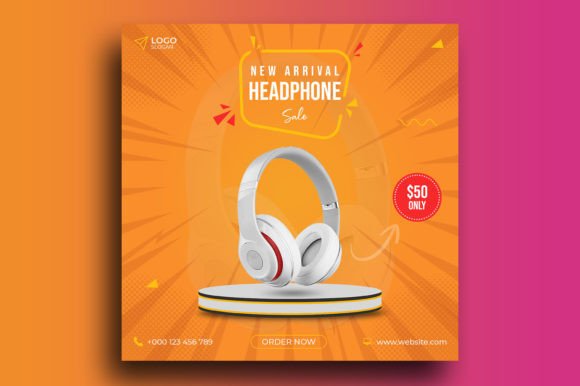
At its core, this template is a pre-designed Photoshop file (PSD) built specifically for promoting headphone sales on social media. It is not a generic flyer or a multi-purpose banner; it is tailored for a specific product category and a specific goal: driving sales through promotional posts. The design is optimized for a square 1080 x 1080 pixel format, which is the standard for Instagram feeds, Facebook posts, and many other social media platforms.
The template comes with a clean, modern aesthetic that prioritizes readability and call-to-action clarity. Because it is delivered as a layered PSD file, users can edit text, swap images, and adjust colors using Photoshop. The file is set to 300 DPI and RGB color mode, which means it is suitable for both digital display and high-quality print if needed—though its primary use case remains social media.
One important detail is that the download does not include the actual product images shown in the demo. You will need to supply your own photographs of headphones or use stock imagery. The template itself provides the layout, typography, and graphic elements, but the product photography is your responsibility.
Key Characteristics and Design Specifications
Let us break down what the template actually includes and what the specifications mean for everyday use.
File Format and Resolution
The PSD file is built at 1080 x 1080 pixels with a resolution of 300 DPI. This resolution is higher than what is strictly necessary for social media—most platforms display images at 72 DPI—but the extra resolution gives you flexibility. You can scale the design down without losing quality, and if you ever want to repurpose the graphic for a small print flyer or a banner, the resolution will hold up well.
Color Mode and Editable Layers
RGB color mode is standard for digital screens, so your colors will appear vibrant and accurate on monitors and mobile devices. The PSD file is organized with separate layers for text, background elements, and graphic accents. This makes editing straightforward: you can change the sale percentage, the product name, the brand logo, or the background color without affecting other parts of the design.
Typography and Fonts
The template uses free fonts, which is a significant advantage. You do not need to purchase expensive typefaces to replicate the look shown in the demo. The specific fonts used are typically indicated in the product description or included as a note, so you can download them before you start editing. This keeps the total cost of using the template at zero beyond your Photoshop subscription.
Image Placement
Because product images are not included, the template includes placeholder areas where you insert your own headphone photos. These placeholders are sized and positioned to work with common headphone angles—over-ear shots, on-ear lifestyle images, or close-ups of earcups. You will need to ensure your own images match the aspect ratio of the placeholders to avoid awkward cropping or stretching.
Practical Value for Marketing and Promotion
What does this template actually help you accomplish? In practical terms, it reduces the time between deciding to run a sale and publishing the post. Instead of starting from a blank canvas, you have a structured layout that already incorporates visual hierarchy, contrast, and spacing principles that are known to perform well on social media.
The square format is particularly useful because it works natively on Instagram, Facebook, LinkedIn, and Pinterest. You do not need to adapt the design for different aspect ratios, which simplifies batch posting across multiple platforms. If you need a vertical story version or a horizontal banner, you would need to create those separately, but the square format covers the most common use case.
Another practical advantage is the built-in call-to-action area. The template typically includes space for phrases like "Limited Offer," "Up to 50% Off," or "Shop Now." This removes the guesswork from where to place your primary message and ensures the sale information is prominent rather than buried in a caption.
Real-World Performance and Usability
In real-world use, the template performs well for users who are already comfortable with basic Photoshop operations. If you know how to open a PSD file, select a layer, use the text tool, and place an image, you can produce a finished graphic in under an hour—often in 20 to 30 minutes once you have your product photos ready.
However, the learning curve is not zero. If you are new to Photoshop, tasks like aligning text, adjusting layer masks, or replacing images without distorting them may require some trial and error. The template does not come with a video tutorial or a written guide; you are expected to have basic familiarity with the software. This is worth considering if you or your team are not comfortable with Photoshop's interface.
One strength that becomes apparent after a few uses is the consistency it provides. If you run multiple headphone sales throughout the year, using the same template with updated images and prices creates a cohesive visual identity. Your audience will start to recognize your sale posts instantly, which builds trust and brand recall.
On the reliability front, the PSD file itself is stable. Provided you are using a recent version of Photoshop (2018 or later), you should not encounter compatibility issues. The layers are named in a logical way, and the file structure is clean enough that even if you need to hand it off to a colleague or freelancer, they can pick it up without confusion.
Who Benefits Most and How to Use It
Not every business or creator will get the same value from this template. Understanding who benefits most helps you determine whether it fits your situation.
Small Business Owners and Entrepreneurs
If you sell headphones as a core product or as part of a larger electronics offering, this template directly addresses your need for quick, professional social media graphics. You likely do not have a dedicated design team, and hiring a freelancer for every sale post can get expensive. A template like this lets you produce consistent visuals in-house without sacrificing quality.
Freelance Marketers and Social Media Managers
If you manage social media accounts for multiple clients, especially in the audio or consumer electronics space, this template can serve as a starting point that you customize for each brand. You can adjust colors, fonts, and layout details to match the client's branding guidelines. The template becomes a productivity multiplier rather than a one-size-fits-all solution.
E-commerce Store Owners
For those running an online store through Shopify, WooCommerce, or a similar platform, this template works well for product launch announcements, seasonal sales, and clearance events. The square format can also be repurposed for Facebook Shop or Instagram Shopping posts with minimal modification.
Content Creators and Bloggers
If you create content around audio gear, music production, or tech accessories, you might use this template to promote affiliate offers or sponsored posts. The professional look can increase click-through rates because the graphic signals that the offer is legitimate and well-presented.
Limitations Worth Considering
No template is perfect, and being upfront about the limitations helps you make an informed decision.
Requires Photoshop. The template is delivered as a PSD file, which means you need an active Adobe Photoshop subscription to edit it. There is no version for Canva, GIMP, or Affinity Photo. If you do not already use Photoshop, the subscription cost may outweigh the benefit of using this particular template.
No included product images. As mentioned earlier, the download does not contain the headphone images shown in the preview. You must supply your own photography or source stock images separately. If you do not have high-quality product photos, the final result may look less polished than the demo.
Single format limitation. The template is built exclusively for a 1080 x 1080 square. It does not include alternate versions for Instagram Stories (1080 x 1920), Twitter headers, or Facebook covers. If you need those formats, you will have to adapt the design manually or purchase additional templates.
Design flexibility is bounded. While the PSD is editable, the overall layout is fixed. If you want to move the text to a different quadrant, change the shape of the call-to-action button, or add extra graphic elements, you may find the layer structure less accommodating than starting from scratch. The template is best used as a framework rather than a fully customizable canvas.
Practical Recommendations for Getting the Most Out of the Template
Based on real-world use, here are a few recommendations that will help you produce better results with this template.
- Invest in good product photography. The template provides the structure, but the product images are what sell the headphones. Use well-lit, high-resolution photos that show the product from angles that highlight its design and features.
- Customize the colors to match your brand. The demo colors are likely neutral or trendy, but your brand palette should take priority. Adjust the background, text, and accent colors to align with your visual identity.
- Keep the text concise. The template works best when the headline is short and the call-to-action is direct. Avoid cramming in too many details; let the image and the sale percentage do the heavy lifting.
- Test the font licensing. Even though the fonts are free, double-check the license terms. Some free fonts are restricted to personal use or require attribution. Using them commercially without confirmation could create legal issues.
- Iterate based on performance. Once you start publishing posts using this template, track engagement metrics like click-through rate, save rate, and direct messages. Use that data to refine your copy, image choice, and offer positioning in future iterations.
Final Observations on Long-Term Value
The HeadPhone Sale Social Media Post template occupies a specific niche: it is a practical, time-saving asset for anyone who needs to produce clean promotional graphics for headphone sales on social media. It does not claim to be a revolutionary design tool, nor does it promise instant viral success. What it offers is a solid foundation that eliminates the need to design from scratch, allowing you to focus on the content and the offer rather than the layout.
Its long-term value depends largely on how often you run sales or promotions. If you post about headphone deals weekly or monthly, the template will pay for itself quickly in terms of time saved. If you only run a sale once a year, a custom design from a freelancer might be a better investment.
For the intended audience—professionals, entrepreneurs, marketers, and creators who need reliable, consistent visuals without a steep learning curve—this template represents a sensible choice. It is not the most advanced or flexible design resource on the market, but it is honest about what it does, and it delivers on that promise without unnecessary complexity. If your goal is to produce effective, professional-looking headphone sale posts with minimal friction, this template is worth adding to your toolkit.