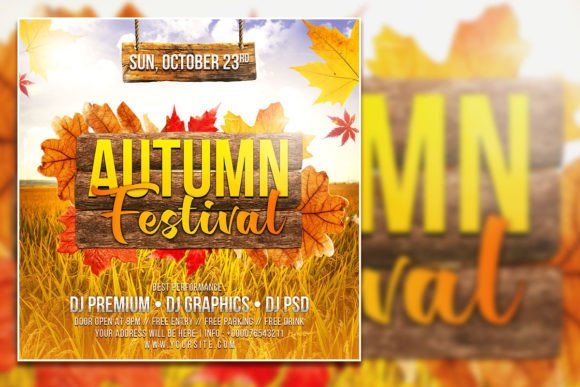
Autumn Social Media Post Template: A Practical Tool for Seasonal Marketing and Content Creation
When the leaves start to turn and the air gets crisp, most businesses and creators feel that familiar push to refresh their visual content. Autumn brings a shift in mood, spending habits, and consumer expectations. The problem is, not everyone has the time or design skills to create polished seasonal graphics from scratch. That is exactly where an Autumn Social Media Post Template becomes more than just a pretty file. It becomes a practical shortcut that saves hours while keeping your brand looking intentional and timely.
Let’s walk through what this template actually does, who uses it, and why it matters in real, everyday situations. No fluff. Just honest observations about how a tool like this fits into actual workflows.
What the Autumn Social Media Post Template Actually Offers
At its core, this is a fully editable PSD template designed for Adobe Photoshop. The file comes in at 2000 x 3000 pixels with 300 dpi resolution, which means it prints cleanly at 4:6 ratio and also works great for digital use. You get organized layers, RGB color mode, and instant download access. The template includes a placeholder photo that you can swap with your own image, giving you full control over the final look. Text layers are editable with the text tool, so changing fonts or rewriting headlines takes seconds.
This isn’t a locked-down design. It’s meant to be customized. Whether you are promoting a fall sale, announcing a seasonal event, or simply updating your social feed to match the season, you can adjust colors, swap images, and rewrite copy without needing to start from a blank canvas.
Where People Use This Template in Real Life
The versatility of this template comes from its straightforward design. It works across multiple platforms and scenarios. Here are some of the most common use cases I have observed among small business owners, marketers, and content creators.
Retail and Ecommerce Promotions
Imagine you run a small boutique that sells candles, scarves, or home decor. Autumn is a prime sales window. People are nesting, buying gifts early, and looking for cozy items. Instead of hiring a designer for every single post, you can use the Autumn Social Media Post Template to create a series of product announcements. Swap the placeholder photo with a shot of your best-selling pumpkin spice candle, adjust the text to read “Cozy Up This Fall,” and schedule the post. You can reuse the same template for different products by changing the image and headline. Consistency across your feed happens naturally because the layout stays cohesive.
Seasonal Event Promotion
Local events like harvest festivals, trunk shows, or autumn workshops need eye-catching graphics. A template like this saves you from reinventing the wheel every time. Change the text to include the event date, location, and a short description. Drop in a photo from last year’s event or a stock image that fits the vibe. The 2000 x 3000 pixel dimensions give you enough resolution to print flyers or posters if needed, while also looking sharp on Instagram, Facebook, or LinkedIn.
Content Creators and Bloggers
Bloggers who focus on lifestyle, fashion, food, or travel often shift their content themes with the seasons. An autumn template helps you create consistent Pinterest pins, Instagram stories, or blog headers. If you are sharing a recipe for butternut squash soup or a guide to fall foliage road trips, the visual theme sets the tone before anyone reads a word. You can batch-create multiple posts in one sitting by duplicating the PSD file and swapping out images and text for each topic.
Educators and Course Creators
Teachers, trainers, and online course creators also benefit from seasonal visuals. If you are launching a new cohort in October, a themed social media post helps communicate that the timing is relevant. You can use the template to promote early-bird pricing, share student testimonials, or announce a free webinar. The editable text lets you tailor the message without worrying about design layout.
Freelancers and Service Providers
Freelancers often need to remind their network that they exist without being pushy. A seasonal graphic can be a soft touchpoint. A graphic designer, for instance, might post “Book your fall branding project now” with a warm autumn background. A photographer could share “Fall mini-sessions available” using the same template with updated text and a client photo. It keeps your feed looking active and on-brand.
Why the Fully Editable Aspect Matters More Than You Think
One of the biggest frustrations with pre-made templates is the feeling that you are stuck with someone else’s choices. That is not the case here. The Fully Editable Autumn flyer template gives you control over every visible element. You can change the font to match your brand identity. You can shift colors to align with your existing palette. You can replace the photo with your own image, which is arguably the most important feature for businesses that have real product shots or personal branding photos.
If you have ever tried editing a flattened JPEG and felt limited, you will appreciate the organized layer structure in the PSD file. Each component sits on its own layer, so you can hide, delete, or modify without affecting the rest of the design. This is especially useful when you want to repurpose the same layout for different campaigns throughout the season.
What to Consider Before Downloading and Using the Template
Not every template fits every workflow, and honesty about the requirements helps you decide if this is the right tool for your stack.
Software Requirements
This template requires Adobe Photoshop. If you do not already have access to Photoshop, you will need a subscription or a trial version. The file is not compatible with free alternatives like Canva or GIMP without conversion, which may break the layer structure. If you are comfortable with Photoshop or willing to learn the basics, the template becomes a reusable asset. If you strictly use browser-based tools, you might need to check compatibility first.
Font Availability
The template uses specific fonts chosen for the autumn aesthetic. When you edit the text, the original font will appear if you have it installed. If not, Photoshop will prompt you to substitute a similar font. You can always download the original font or use your own. The key point is to be aware that font matching may require an extra step if you do not have the exact typeface.
Image Resolution and Print Use
Because the file is 300 dpi at 2000 x 3000 pixels, it prints well as a flyer or small poster. However, if you plan to use the design for large-format printing like billboards or banners, you may need to scale carefully. For digital use, the resolution is more than sufficient. Social media platforms compress images anyway, so starting with a high-resolution file actually helps maintain quality after upload.
How Different Users Benefit in Different Situations
The same template can serve completely different purposes depending on who is using it and what they need in the moment.
A marketer at a mid-sized company might use it to create a series of A/B test posts for an autumn email campaign. They can keep the same background but vary the headline and call-to-action button color across versions. The organized layers make that kind of iterative work fast.
A hobbyist who runs an Etsy shop on the side might use the template to create a simple “Back in Stock” announcement. They are not a professional designer, but they can open the PSD, drop in a product photo, and change the text to match their shop branding. The template lowers the barrier to entry for people who want their shop to look polished without spending hours in design software.
A publisher or author promoting a new book release in the fall can use the template to create a cohesive launch campaign. Swap the photo for the book cover, add the release date and where to buy, and use the same layout across Instagram, Facebook, and Twitter. The visual repetition reinforces the message.
A non-profit organization planning a fall fundraiser can use the template to promote the event across multiple channels. The editable text lets them include donation links, volunteer signup details, or a countdown. The warm autumn tones naturally evoke feelings of community and gathering, which aligns well with fundraising goals.
Practical Tips for Getting the Most Out of the Template
If you decide to use the Autumn Poster Editable PSD Template, a few habits will make the experience smoother.
First, organize your images before you start editing. Gather the photos you want to use, crop them to a similar ratio if possible, and save them in a folder. This prevents the frustration of hunting for files mid-edit.
Second, decide on a color palette that complements the autumn theme but also fits your brand. The template likely uses warm oranges, browns, or golds. You can shift those to deeper maroons, muted greens, or even neutral beiges if that matches your identity better. Consistency across posts builds recognition faster than using a random palette each time.
Third, save a master version of the PSD file that contains your brand fonts and colors. Then duplicate that file for each new post. This way, you never accidentally overwrite your base template.
Fourth, think about the text length before you write. Templates have fixed text areas, and cramming too much copy forces awkward font sizes. Keep headlines short and body text concise. If you need more space, consider using the template as a background and adding text inside a social media scheduling tool after export.
Final Thoughts on Using an Autumn Social Media Post Template
Seasonal marketing does not have to mean starting from zero every few months. A well-made template like this offers a foundation that you can adapt, reuse, and remix throughout the fall. Whether you are promoting a product, sharing a personal project, or building a campaign for a client, the time you save on layout and design can go toward more strategic tasks like writing better captions, engaging with your audience, or planning your next move.
The availability of an Autumn Social Media Post Template that is fully editable, print-ready, and instant download means you can act fast when opportunities arise. Last-minute promotion? Swap a photo and update the text. Need to refresh your feed for October? Duplicate the PSD and batch-create five posts in under an hour. The flexibility is built in, and the results depend entirely on how you choose to use it.
If you already have Adobe Photoshop and a clear idea of what you want to communicate, this template removes the friction between intention and execution. That is the kind of tool worth having in your creative toolkit, season after season.